

Yes, you can remove duplicates emails from Outlook inbox file. There are two processes to consider. One requires technical skills and the other is user-friendly. We recommend you to consider a third-party program to remove duplicates without losing file quality.
Pcinfotools Outlook Email Duplicate Remover
It is an advanced application dedicated removing duplicates from Outlook PST and OST file formats. In other words, you will get the license of an all-in-one duplicate remover. Whether you are using Outlook email clients, the application can help remove duplicates. It is a modern-day advanced application with an interactive interface.
Significant Features of Pcinfotools Email Duplicate Remover
The application holds a single window to execute the duplicate removable task.
- The interface of the app is user-friendly. It doesn’t demand in-depth technical skills to run individually. A novice can operate the application.
- It can remove duplicates from single to multiple PST files in one go, with outstanding feature of the app.
Also allows users to get rid of duplicates across all folders or within each folder. Hence, it promises to give custom results. - There is a preview pane to feature the folder name, messages, and any duplicates the tool has recorded. In this way, you can be sure that the application will remove only duplicates.
- The advanced app uses an advanced algorithm to judge duplicate items, like item size, item mail properties, and other factors. Therefore, it eliminates the chances of removing essential items.
- The licensed version of the application is available for an indefinite period. Users can use the app for an indefinite duration. Hence, it offers unlimited duplicate removal tasks.
Steps to Use the Application
- Download the application on your system.
- Launch the program and choose PST file format.
- Select an option to filter PST files and then the Browse button.
- Select PST files and get a preview of these files.
- Choose folders from where you want to remove duplicates.
- Choose an appropriate duplicate type- across all folders or within all folders
- Provide the output location to save data.
- Press the duplicate to remove mails button.
Remove Duplicates emails from Outlook Inbox Manually
- Access your MS Outlook account.
- Select the Mailbox folder, like Inbox containing duplicate items.
- Press the Home tab and then Clean up icon.

- Choose the below options.
- The Clean Up Folders option
- Clean Up Conversation option
- Clean Up Folders & Subfolders option.
- Right-click on the Deleted Items Folder & press the Empty Folder tab to sort out the duplicate problem.
Also Read:- Extract attachments from Outlook folder
Follow the Below Steps to Prevent Duplicate Issue Near Future
Here are the steps you can take to eradicate the duplicate data problem.
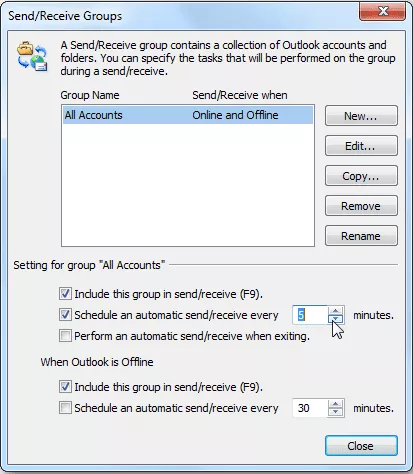
- Open your MS Outlook application and click on the Send/Receive button.
- Choose “Define Send” or “Receive Groups”
- Click the box “Schedule an automatic send/receive every” and provide the duration as per minutes or hours.
Downsides of the Manual Solutions
There are some drawbacks of manual solutions that one cannot ignore. We have cracked down on some issues users face, while trying to fix the duplicate issue with Outlook for Windows manually.
Time-Taking Method
More than 90% of manual solutions are time-consuming. You need to keep patience while you choose a manual solution for conversion.
No Custom Deletion of Duplicates
The manual solution doesn’t offer the removal of duplicates duplicate for selective emails. It allows only to delete of duplicates from selective folders.
Risk of Corruption & Data Loss
Users face data loss risk, because manual solutions are not designed to remove duplicates specifically. You may accidentally lose your important emails.
An Outdated Solution
The solution we have offered is practicing for years. It was popular in 2000. Now, users like to use a third-party utility to remove duplicates without data loss.
Conclusion
Manual solutions involve several drawbacks. You never want to follow a manual solution that requires much time and doesn’t give an assurance of data quality. On the other hand, a third-party utility provides the best solution by delete duplicates emails from Outlook inbox 2019, 2016, 2013, & others. Users get control over the functions of the app to get the finest results.